
IT asset disposition (ITAD) is the documented process a business uses to retire IT equipment. It covers tracking each device, destroying the data on it, reselling or reusing what still has value, recycling the rest with a certified recycler, and keeping records that prove each step. The paperwork is what sets it apart from plain recycling.
This guide is for office managers, IT leads and compliance staff who have to retire equipment for the first time, or who want to turn an informal habit into a written process. It walks through each step, the document you should receive at each stage and how to write a short policy. If you are in San Diego County, see our IT asset disposition service.
What is IT asset disposition?
IT asset disposition is the last stage in the life of business technology. The business takes a device out of service, makes its data unreadable, and then reuses or recycles it. A record covers each step, so the business can show what happened to every serial number it owned.
Most people picture computers. In practice, an IT asset is anything your business owns that processes, stores or moves data. That usually includes:
- Desktops, laptops and workstations
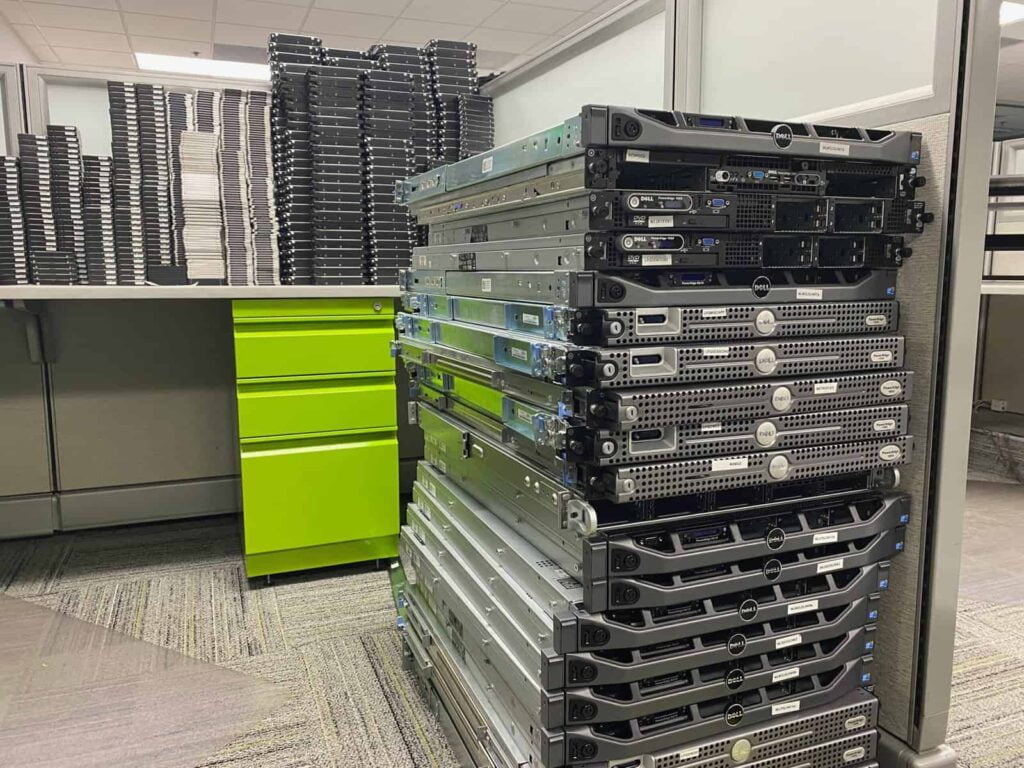
- Servers, storage arrays and backup appliances
- Networking gear such as switches, routers, firewalls and wireless access points
- Phones, tablets and desk phones
- Printers, copiers and multifunction devices (many have an internal drive)
- Loose hard drives, SSDs, USB sticks, memory cards and backup tapes
- Monitors, TVs and meeting room displays, which hold no data but leave with the rest
Office furniture, general trash and hazardous liquids such as paint or chemicals sit outside ITAD. They need their own disposal routes.
IT asset disposition became its own service because the risk changed. Old equipment used to be mainly a materials problem. Today one laptop can hold years of client files and saved passwords. So the data and the proof matter as much as the metal and plastic.
Why IT asset disposition matters for a business
A closet of old laptops looks harmless. However, it carries real risk, some legal duties and often a little value that nobody has claimed. Good IT asset disposition deals with all of it at once.
Data left on retired devices
Deleting files or running a factory reset doesn't sanitize a drive. The data is often still there, and free recovery tools can read it. NIST SP 800-88 Rev. 2, the federal guidance on media sanitization finalized in September 2025, defines sanitization as a process that makes access to the target data infeasible for a given level of effort. That is the bar a disposal process should meet.
Different media need different methods. For example, a working SSD headed for resale needs different handling from a failed hard drive or a backup tape. Our guide to data destruction methods explains the options and when each one fits.
Legal duties
In California, Civil Code 1798.81 requires a business to take reasonable steps to dispose of customer records containing personal information by shredding, erasing or otherwise making that information unreadable. The federal FTC Disposal Rule sets a similar duty for consumer report information. California also manages most discarded electronics as universal waste, so a business can't put them in the trash.
Also, healthcare practices, lenders, law firms and schools often have extra rules on top of these. Our overview of California e-waste laws covers the state rules. For sector rules, check with whoever owns compliance in your organization.
Value and the environment
Newer business equipment often has resale value, which can offset some or all of the cost of the job. Some recyclers pass part of that value back to the customer. Even equipment nobody can reuse still contains metals and plastics that a recycler can recover.
Electronics also contain hazardous materials, which is why California keeps them out of landfills. Independent auditors also check how a certified recycler handles both the reusable equipment and the waste.
The IT asset disposition process, step by step
The ITAD process has six steps. First, inventory what you are retiring. Second, move it under a chain of custody. Third, sanitize or destroy the data. Fourth, test and resell what has value. Fifth, recycle the rest. Sixth, close out with a final report that matches your inventory.
The steps below explain what happens during IT asset disposition and why each one exists, so you can spot a gap in a provider's process.
1. Inventory and plan
List every device by type, serial number and asset tag, and mark the ones that store data. Note where each item sits and the date it must leave, such as a lease end or move-out day.
Before anyone wipes a drive, check two things. Leased equipment usually goes back to the lessor, so it may not be yours to dispose of. Also, keep any device under a legal hold or audit request until legal or compliance releases it.
In fact, this list is the backbone of the whole job. Every document you receive later should match it, line by line.
2. Secure collection and chain of custody
Chain of custody in ITAD is an unbroken record of who had each device, where and when, from the moment it leaves your office to its final disposition. It usually starts with a signed pickup record and continues with scans when the provider receives the equipment. If a device goes missing, the record shows where the gap is.
Until pickup, keep retired devices in a locked room or cage that only a few people can open. Ask your provider how it transports equipment, and whether it keeps data devices apart from the rest of the load once they arrive.
3. Data sanitization or destruction
The provider either wipes each data-bearing device so it can go back into use, or destroys it physically. Wiping (also called logical sanitization) suits working drives headed for resale. Destruction, on the other hand, suits failed drives, media that a wipe can't clear reliably, and data so sensitive that nobody wants the drive back in circulation.
Some businesses ask for on-site destruction so drives never leave the building. Whichever method the provider uses, you should get a certificate of destruction listing each serial number, the method and the date. If someone on your team still trusts a reset, share why a factory reset is not data destruction.
4. Test, grade and remarket
Next, the provider tests and grades equipment that still has resale value, then sells or redeploys it. This step applies only to newer, working gear, usually business-class laptops, servers and networking equipment. Older devices tend to have material value only.
If the provider resells anything, you should get a statement showing what sold and what, if anything, came back to you. Agree how resale works before the pickup, not after.
5. Recycle the rest
Then the provider takes apart whatever can't go back into use and sends it for materials recovery. The R2v3 standard requires certified recyclers to evaluate equipment for reuse first and then recover as much material as possible.
Much of that work happens at downstream vendors, the specialist processors that take sorted materials such as circuit boards, batteries or glass. A good provider qualifies and tracks those downstream vendors and can tell you who they are.
6. Reporting and close-out
At the end of the job, the provider sends the final documents. Reconcile them against your original inventory. Any device on your list that isn't on the report needs an answer before you close the project.
Then file everything where IT and compliance can both find it. If a client or auditor asks about one laptop a year from now, you should be able to find its serial number in a few minutes.
Which IT asset disposition documents should you get?
Each stage of the job should leave a document behind. Use this table to check what your provider sends and what each paper proves.
| Stage | What you should receive | What it proves |
|---|---|---|
| Inventory and pickup | A signed pickup receipt with the item count, ideally by serial number | What left your site, when and who took it |
| Transport and intake | A chain-of-custody record and an intake report | Nothing went missing between your door and the facility |
| Data sanitization or destruction | A certificate of destruction listing serial number, method and date | Nobody can read the data on each device |
| Resale | A settlement or value-recovery statement | What sold and what came back to you |
| Recycling | A certificate of recycling or a recycling report | What wasn't reused went to a recycler |
| Close-out | A final serialized asset report | The report accounts for every item on your inventory |
IT asset disposition vs electronics recycling
Electronics recycling recovers materials from old devices. IT asset disposition includes recycling, but adds serial-level tracking, verified data destruction, resale of working equipment and the documents that prove each step. The same truck and the same facility can handle both. The difference is the paper trail and the value recovery step.
A household dropping off an old printer needs recycling. By contrast, a business retiring laptops full of client data needs ITAD, even if the equipment ends up at the same recycler.
| Question | Electronics recycling | IT asset disposition |
|---|---|---|
| Main goal | Recover materials safely | Retire assets securely and prove it |
| Tracking | By weight or by load | By serial number and asset tag |
| Data handling | Often left to the owner | Sanitized or destroyed and certified per device |
| Value back | Rare | Possible for newer equipment |
| Documents | A receipt or recycling record | Chain of custody, certificates of destruction and an asset report |
ITAD vs ITAM
IT asset management (ITAM) tracks equipment while it is in use. ITAM records who has each device, what runs on it and when the warranty ends. IT asset disposition is the final stage of that life.
The two meet at retirement. If your ITAM records are accurate, you have already done most of the ITAD inventory. If you have no ITAM system, the ITAD inventory often becomes the first complete list of what the business owned.
Who needs IT asset disposition?
Any organization that retires devices holding business, customer, patient, student or employee data needs some form of IT asset disposition. Also, size doesn't change that. A small accounting office replacing five laptops has the same duty to protect client data as a company emptying a server room. Its job is just smaller.
Some groups meet the question more often than others:
- Healthcare practices and labs, which hold patient records and have their own federal disposal duties
- Finance, insurance and legal offices, where client files sit on every laptop
- Schools and districts with surplus Chromebooks and lab computers, covered in our guide to school e-waste recycling
- Property managers clearing devices that tenants left behind in units and offices
- Any business doing a laptop refresh, an office move or a closure
Choosing an IT asset disposition provider
The EPA recommends using a certified electronics recycler and names two accredited standards, R2 and e-Stewards. Independent certifying bodies audit certified recyclers, with ongoing oversight. That is a sound first filter for any IT asset disposition provider, but a logo on a website tells you little on its own.
Check these points before you sign:
- A current certification you can look up yourself, for the facility that will handle your equipment
- A written data destruction method for each type of media
- Certificates of destruction and asset reports at the serial-number level
- A downstream chain the provider will disclose
- Insurance that covers your equipment while it is in their care
R2v3 is certified facility by facility, and each certificate lists the process requirements audited at that site. A recycler that wipes drives for resale, for example, needs the data sanitization appendix (Appendix B) on its certificate. e-Stewards, run by the Basel Action Network, is the other recycler standard. NAID AAA, from i-SIGMA, certifies data destruction providers rather than recyclers.
For the full list of questions and what good answers sound like, read how to choose an ITAD vendor.
What does IT asset disposition cost, and can you get money back?
There is no standard price list for IT asset disposition, because no two jobs are the same. What you pay, or get back, depends on the equipment and the work around it.
What drives the cost
Providers usually quote ITAD per project. The main cost drivers are volume, where the equipment is and how easy it is to reach, whether the provider must take racks apart, whether it destroys drives on site, and how much documentation you need.
Many recyclers collect standard business equipment free, because its material and resale value covers the work. A small fee applies to a few items that cost money to process, such as some batteries and bulbs. Ask for a written quote that names anything with a fee.
Value recovery
Newer business-class laptops, servers and networking gear can have resale value. Older equipment usually has material value only, which is why recyclers often collect it free rather than buy it.
If you expect value back, ask how the provider handles resale and what statement you will receive before the pickup. Our IT equipment liquidation page explains how we assess equipment with resale value.
Write a simple IT asset disposal policy
A written IT asset disposal policy turns a one-off clean-out into a repeatable process. It doesn't need to be long. Copy these headings into a document and fill in each one for your business.
- Scope. Which devices and media the policy covers, including printers, phones and loose drives.
- Roles. Who approves retirement, who keeps the inventory and who signs off the final report.
- Retirement triggers. Refresh cycles, failures, lease ends and staff departures.
- Inventory and tagging. What you record for each device before it leaves service.
- Sanitization methods. Approved methods by media type, with NIST SP 800-88 Rev. 2 as the reference.
- Approved vendors. Which providers you use and the documents each one must supply.
- Storage before pickup. A locked, dated area, and the longest time equipment may wait there.
- Records and retention. Where you keep documents and for how long.
- Exceptions. Legal holds, leased equipment and anything else that needs sign-off.
There is no single legal retention period for IT asset disposition records. Set yours based on your legal, contract and audit needs. For the California action list that sits alongside this policy, use our commercial e-waste compliance checklist.
Planning a refresh, move or closure
Big events create most of a business's retired equipment. A laptop refresh, an office move or a closure puts dozens of devices in one place with a fixed deadline. Start the inventory early, book the pickup well before the move date, and decide on on-site or off-site destruction while there is still time to arrange it.
Server rooms need more planning. Your team or provider has to power down racks in an agreed window, de-install and label them, and pull and log drives before anything moves. Our data center decommissioning page covers that kind of project.
IT asset disposition in San Diego County
Dream E-Waste is an R2v3-certified electronics recycler with CalRecycle CEWID 127772. We handle everyday recycling and IT asset disposition, often on the same pickup. By default, we wipe and data-destroy every data-bearing device we receive. Business customers get a standard certificate of destruction that lists serial numbers. It comes included and takes 3 to 5 business days to arrive.
Pickup is free for 5 or more computing devices, meaning computers, laptops, monitors, servers, printers and TVs. Miscellaneous items don't count toward that number. For office or industrial equipment and clean-outs, email us photos first. Large volumes need our approval before we schedule them.
You can also bring equipment to any of our six locations. We don't accept loose damaged batteries, hazardous liquids, medical waste or furniture. Read more about our IT asset disposition service in San Diego.
How to start a business pickup
Send us a rough inventory with device types, approximate counts, how many hold data, the address and any deadline. Photos help for anything unusual. We will tell you what qualifies for free pickup, what needs approval first and which documents you will receive. When you are ready, request a free business e-waste pickup.
Frequently asked questions
Does a factory reset do enough before you dispose of a business laptop?
No. A factory reset can leave data that recovery tools can still read, especially on drives that nobody encrypted. So before a business laptop leaves your control, sanitize its drive with a verified method or destroy it physically. You should also get a certificate of destruction that lists its serial number.
What documents should I get from an ITAD provider?
You should get a pickup receipt, a chain-of-custody record, certificates of destruction by serial number for data devices, a settlement statement if anything sold, a recycling certificate or report, and a final asset report. Together they show what left your site and what happened to each device afterward.
Is ITAD only for large companies?
No. Any business that retires devices holding client, patient or employee data needs proof of data destruction. A small office with five laptops can face the same question from a client or auditor as a company with a server room. The job is simply smaller and quicker.
How long should we keep ITAD records?
There is no single rule that fits every business. Set a retention period in your disposal policy based on your legal duties, client contracts and audit needs. Keep the records where IT and compliance can both reach them. Regulated sectors such as healthcare and finance often have their own timelines, so check those first.
What happens to equipment with no resale value?
It goes to recycling. A certified recycler takes it apart and sends sorted materials, such as metals, plastics and circuit boards, to downstream processors for recovery. Under R2v3, the recycler has to qualify and track those downstream vendors. Ask your provider for a certificate of recycling or a recycling report as proof.